
As more business systems run in the cloud, cloud infrastructure security becomes a day-to-day responsibility rather than a one-time setup. Cloud providers secure the underlying platform, but you are responsible for how your own resources are configured and used. These best practices help you protect your data and workloads.
Understand the Shared Responsibility Model
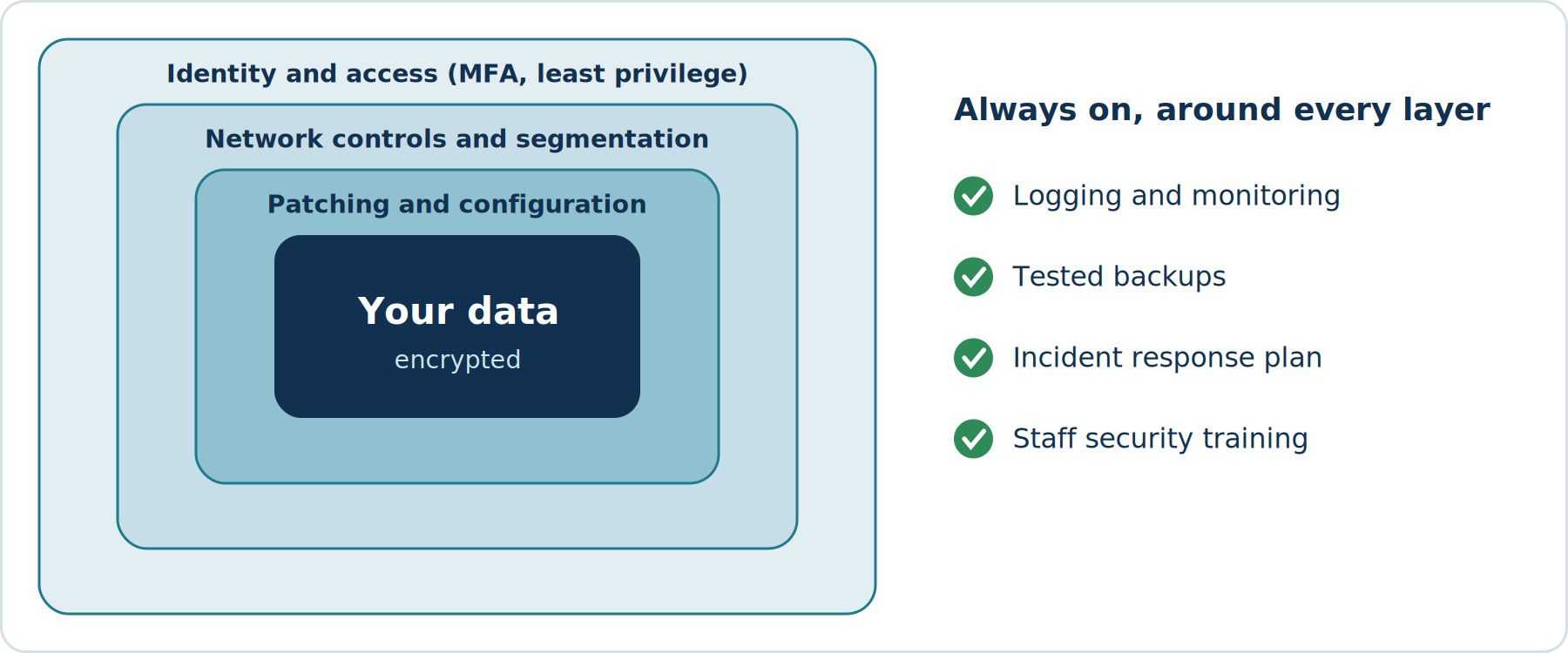
Providers protect the physical data centres and core services. You are responsible for your data, user access, application settings and network configuration. Many cloud breaches result from customer-side misconfiguration, so knowing where your responsibilities begin is the first step.
1. Secure Identity and Access
- Use least-privilege access so people and services only get the permissions they need.
- Require multi-factor authentication, especially for administrators.
- Avoid shared accounts and remove access when people change roles or leave.
- Review permissions regularly and delete unused accounts and keys.
- Protect the root or owner account and avoid using it for daily tasks.
2. Encrypt Your Data
Encrypt data both at rest in storage and databases, and in transit across networks. Manage encryption keys carefully, limit who can access them and rotate them according to your policy.
3. Control Your Network
- Place resources in private networks and expose only what must be public.
- Use security groups and firewall rules that allow only necessary traffic.
- Segment environments, for example separating production from testing.
- Use private connectivity or VPNs for administrative and internal access.
- Consider a web application firewall for public-facing applications.
4. Prevent Misconfiguration
Publicly exposed storage and overly open network rules are common causes of data leaks. Use infrastructure as code with secure templates, and run automated tools that scan your environment for risky settings.
5. Enable Logging and Continuous Monitoring
Turn on audit logging for all accounts and services, send logs to a central location and set alerts for suspicious activity such as unusual logins, permission changes or large data transfers. You cannot respond to what you cannot see.
6. Keep Systems Patched and Updated
Apply security updates to operating systems, containers and applications promptly. Scan for known vulnerabilities regularly and prioritise fixes based on risk.
7. Back Up Your Data and Test Recovery
Keep regular backups, store copies separately from production access and protect them from accidental or malicious deletion. A backup is only useful if you have tested that it can be restored.
8. Prepare an Incident Response Plan
Decide in advance who does what when an incident occurs. Document steps for containing a breach, communicating with stakeholders and recovering, and practise the plan through simulated exercises.
9. Meet Compliance Requirements
Identify the regulations that apply to your industry and region, such as data protection and financial rules. Use provider compliance tools and document your controls so audits are easier.
10. Train Your Team
People remain a major risk factor. Train staff to recognise phishing, handle credentials safely and follow secure practices for cloud resources.
Final Thoughts
Strong cloud infrastructure security is built from many small, consistent practices: controlled access, encryption, careful configuration, monitoring and tested recovery. Review your setup regularly, because environments and threats change. For sensitive or regulated systems, consider a professional security assessment.