
When planning a move to the cloud, one of the first questions is which platform to choose. This comparison of AWS vs Azure vs Google Cloud for migration looks at where each provider tends to fit best. All three are mature, secure and capable, so the right choice usually depends on your existing technology, skills and goals rather than on one being universally better.
Amazon Web Services (AWS)
AWS is the longest-established of the three and offers a very broad catalogue of services across computing, storage, databases, analytics and more. Strengths: breadth of services, large global footprint, mature ecosystem and a large pool of experienced professionals. Consider: the number of options and pricing models can feel complex for newcomers.
Microsoft Azure
Azure integrates closely with Microsoft products, which makes it a natural choice for organisations already using them. Strengths: strong integration with Windows Server, Active Directory and Microsoft 365, good hybrid cloud options and licensing benefits in some scenarios. Consider: evaluate the specific services you need, as maturity can vary between them.
Google Cloud Platform (GCP)
Google Cloud is well regarded for data analytics, machine learning and container-based workloads, reflecting Google's own technology background. Strengths: data and AI services, Kubernetes heritage, and developer-friendly tooling. Consider: a smaller enterprise ecosystem than the other two in some regions, so check local support and partners.
Quick Summary
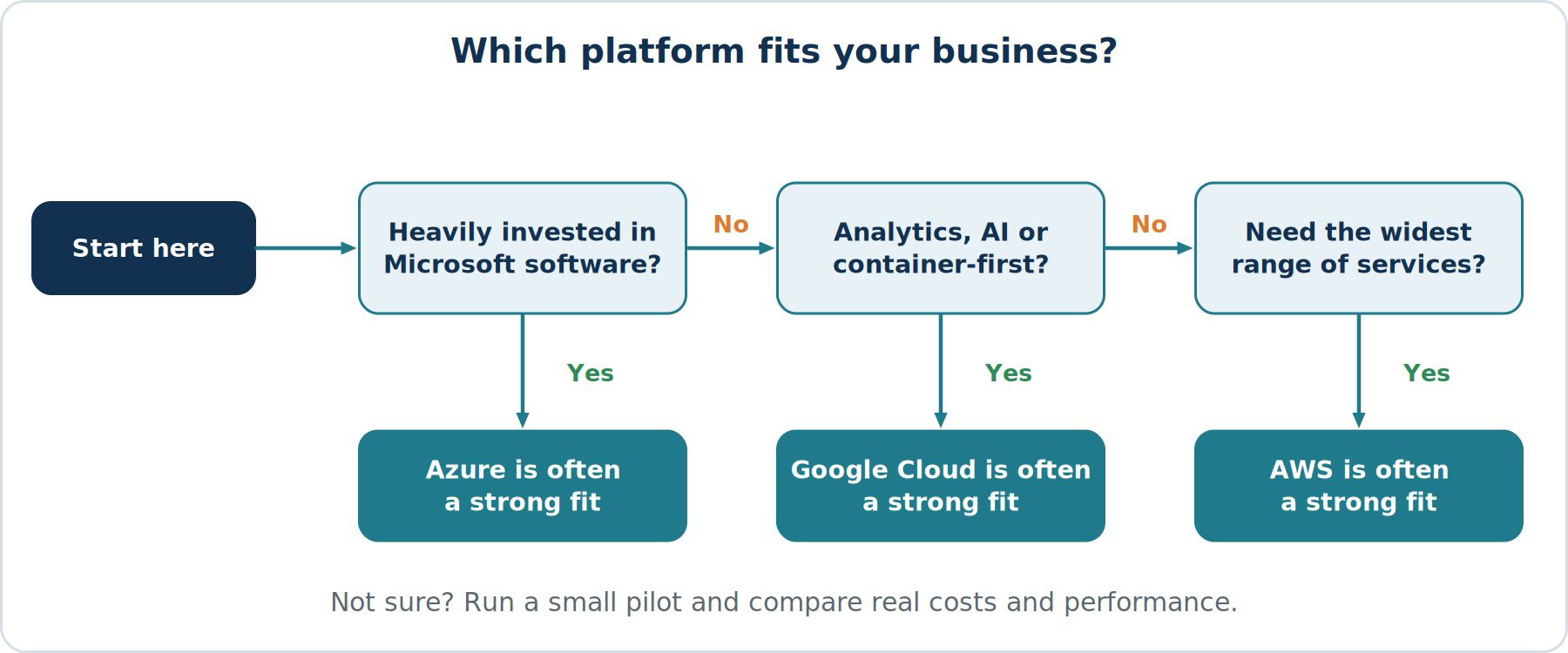
- Best known for: AWS for service breadth, Azure for Microsoft integration, Google Cloud for data, AI and containers.
- Ideal fit: AWS for a wide range of workloads, Azure for Microsoft-centric organisations, Google Cloud for analytics and cloud-native teams.
- Hybrid approach: Azure is particularly strong, while AWS and Google Cloud also offer hybrid options.
- Learning curve: AWS has a large catalogue to learn, Azure is easier for Microsoft-skilled teams and Google Cloud is developer friendly.
Factors to Consider When Choosing
- Existing technology stack. If your business runs on Microsoft software, Azure may reduce friction. If your applications are open source or container-based, any of the three can work.
- Team skills. Choose a platform your team can learn and operate effectively, or one your chosen partner knows well.
- Workload requirements. Match specific needs, such as analytics or machine learning, to the provider's relevant services.
- Compliance and regions. Confirm that the provider has regions and certifications that meet your regulatory needs, including data residency.
- Pricing and commitments. Compare estimates using each provider's calculator for your actual workloads, and understand discount and commitment options.
- Support and partner ecosystem. Check the availability of local support and certified partners in your region.
- Lock-in concerns. Using proprietary services increases dependency. Consider portability where it matters to you.
Should You Use More Than One Cloud?
A multi-cloud approach can reduce dependency on one vendor and let you use each provider's strengths, but it adds complexity in security, skills and management. For most small and mid-sized businesses, starting with one platform is simpler and easier to control.
Final Thoughts
The best cloud platform is the one that fits your workloads, people and budget. Run a small pilot, compare real costs and performance, and involve a cloud specialist if you need an independent assessment. A well-planned migration to any of the three leading providers can deliver strong results.